
Trace Teams
AlpineReplaySports
4.974.00 Reviews
- Version
- 3.2.1
- Installs
- 10.00K
- Age Rating
- Everyone
Screenshots

Our Review of Trace Teams
 Analysis by Appyee
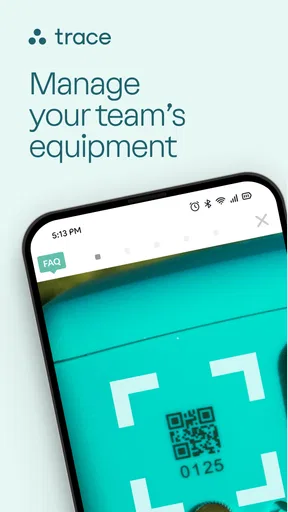
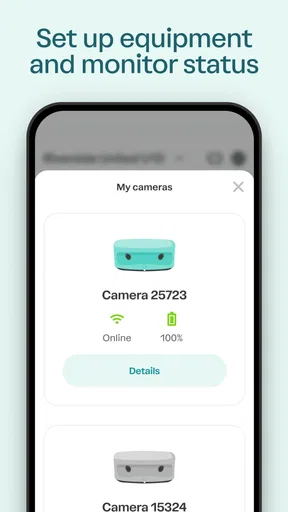
I spent time with Trace Teams as a sports companion for managing Trace equipment, video uploads, and team rosters, and my impression is quite specific: this is not a general video editor or a broad team-management platform. It is a focused tool built around AlpineReplay’s Trace ecosystem. If your group already uses TraceCam and its case, the app gives those pieces a more practical place to live. If you do not use that equipment, much of its value disappears immediately.
The app is free, aimed at everyone, and comes from AlpineReplay. Its average rating is 4.9 from around 484 ratings, with roughly 74 written reviews and over 10 thousand installs. Those figures suggest a small but highly satisfied audience rather than a mass-market sports app. I think that distinction matters: Trace Teams feels designed for people who have a clear reason to use it, not for someone casually browsing for a fitness tracker or a generic way to organize a club.
How Trace Teams feels in real use
I look at trust in Trace Teams through the choices a user can actually make, not assumptions about privacy or security. In this section, I focus on the practical points where I would pause before connecting equipment or handling team footage, then turn to how the app’s controls fit into that routine.
Quick access matters more than visual extras
My first expectation with an app like this is that it should get out of the way. The useful moments are usually practical ones: checking which athletes belong to a roster, handling a TraceCam, preparing a video upload, or dealing with the case before heading out. In that setting, speed is less about flashy animation and more about avoiding unnecessary steps. Trace Teams makes sense when I treat it as a control point for the Trace setup rather than as an app I open for entertainment.
The narrow purpose is one of its strengths. There is less temptation to wander through unrelated sports content, social feeds, or training dashboards. When I am trying to organize a group session, a dedicated equipment-and-roster workflow is easier to understand than a large platform that mixes scheduling, messaging, statistics, and media in one crowded interface.
That focus also creates a clear expectation: the app should feel quickest when I am already inside the Trace workflow. Opening it to perform a task connected to the camera or case is a natural use. Opening it without Trace equipment and hoping it will become a complete team-management solution is not. The difference between those two situations is more important than any general claim about app speed.
Where heavier work can change the experience
Video uploads are the part I would treat differently from roster management. A roster action is usually a lightweight organizational task, while video handling depends on the size of the recording, the phone’s available storage, the quality of the network connection, and what else the device is doing. Even when the interface responds promptly, the upload itself may take patience. That is normal for media, but it is worth planning around rather than assuming every operation will feel instant.
A useful habit is to prepare uploads before the moment when everyone is waiting. After a day on the slopes, I would rather start the transfer while the phone is charging and connected to a dependable network than begin it in a crowded parking area with limited connectivity. This is one of the less obvious practical lessons of using a camera-linked app: the workflow is not only about the app. It also includes battery level, free space, connection quality, and whether the phone can remain undisturbed during the transfer.
For team use, I would separate administrative work from media work whenever possible. Updating a roster before the session and uploading footage afterward reduces the chance that a large transfer becomes the center of the whole experience. It also makes troubleshooting easier because I can tell whether a problem belongs to the account or roster side, the equipment connection, or the video process.
Stability is most valuable during preparation
Reliability here should be judged by the complete chain: the phone, TraceCam, case, app, and upload destination. Trace Teams is useful because it brings several of those Trace-related tasks together, but that also means there are more points where a real-world session can become inconvenient. A phone may be low on power, the camera may not be ready, or a transfer may be interrupted. The app cannot remove every external issue.
I would therefore avoid leaving the first setup until the last minute. Before a team day, I would open the app, check the relevant roster, make sure the Trace equipment is available, and confirm that the phone has enough room for the planned media workflow. That small preparation step is more valuable than repeatedly reopening the app after something goes wrong. It turns a potentially stressful field problem into a quick check performed at home.
Recovery is another area where a focused workflow helps, but I would still keep expectations realistic. If an upload is interrupted, the sensible response is to stabilize the conditions first: reconnect properly, keep the device awake as appropriate, and avoid starting several demanding tasks at once. I would not treat a failed transfer as proof that the app is unreliable, because video movement is affected by circumstances outside the software. At the same time, users who need guaranteed instant publishing should consider whether a camera-centered workflow suits them.
What the phone has to cope with
Trace Teams runs on devices using iOS 11 or later, so compatibility is broad enough for many supported iPhones and iPads. Still, operating-system support does not tell me how comfortable every older device will feel during camera-related work. The practical limits are likely to appear when the phone is already busy, short on storage, or handling large video files. I would be more confident using a reasonably maintained device than relying on an old phone that is already struggling with media.
Storage deserves special attention. Even if the app itself is not demanding, video workflows can quickly make a phone feel constrained. Before a trip or team event, I would remove unnecessary downloads, review the camera roll, and leave room for temporary files and new recordings. This is a concrete advantage of planning ahead: it prevents an app-level task from being blocked by a device-level shortage.
Battery is equally important. Camera accessories and transfers are not the kind of activities I would schedule at the end of a long day with a nearly empty phone. A portable charger can be more useful than any setting inside the app, especially when several athletes or runs need attention. I also prefer handling uploads in batches instead of repeatedly connecting and disconnecting equipment throughout the day, since that keeps the workflow simpler and reduces unnecessary interruptions.
Managing rosters without turning the app into a spreadsheet
The roster function is where Trace Teams can become more than a camera companion for a coach or group organizer. A clear roster gives the media process context: footage is not just a pile of clips, but something associated with the people taking part. I find that especially useful when several athletes share one session and the person handling the equipment is not the same person reviewing every clip later.
There is a trade-off, though. A roster tool connected to a specific Trace workflow is helpful for Trace users, but it is unlikely to replace a full club-management system. If your group needs detailed attendance history, payments, calendars, long-form announcements, or extensive parent communication, I would choose a dedicated team platform alongside it rather than expecting this app to do everything. Trace Teams makes more sense as the equipment and media layer in that arrangement.
One practical approach is to keep the roster clean before a busy session instead of trying to make many changes while people are waiting. If the group changes often, I would review names and assignments in advance and use the app during the event mainly for confirmation and media-related tasks. That reduces screen time in cold weather and keeps the organizer focused on the athletes rather than on administration.
A realistic day on the slopes
Imagine I am helping a small training group during a weekend session. Before leaving, I open Trace Teams, review the roster, charge the phone, check available storage, and make sure the TraceCam and case are ready. That preparation takes more value from the app than simply installing it at the resort and hoping the workflow will sort itself out.
During the session, I want the app to support the equipment rather than compete for my attention. I would avoid unnecessary browsing, keep the phone protected from the conditions, and handle only the checks that matter. Later, back at a stable connection, I would begin the video uploads and let them run without launching other demanding media tasks. Once the transfer is complete, the roster context makes it easier to understand whose footage belongs to the session.
This scenario shows both the appeal and the limitation. Trace Teams can make a Trace-centered day more organized, but it is not a magic shortcut around preparation. The smoothest experience comes from treating the app as one part of a small system. The person, phone, camera, case, connection, and roster all need to be ready.
How it compares with familiar alternatives
Compared with a generic cloud drive, Trace Teams is more relevant to Trace equipment because its purpose is tied to managing the camera, case, uploads, and rosters. A cloud drive may be better for storing many kinds of files across different devices, but it would not be a natural replacement for a Trace-specific workflow. I would choose the broader service for general archiving and Trace Teams for the connected sports process.
Compared with a team communication app, the difference is even clearer. Messaging platforms are better for announcements, conversations, and scheduling, while Trace Teams is better suited to the equipment and footage side of a group activity. A club may reasonably use both: one for people and communication, the other for Trace operations. Trying to force either app to cover the other’s job would create unnecessary friction.
Compared with a general sports video editor, Trace Teams appears more useful before and during the transfer process than for creative editing. If my priority were trimming clips, adding music, building a polished highlight reel, or publishing to several social networks, I would look elsewhere. If my priority were keeping TraceCam-related work and participant organization together, the focused design would be more appealing.
Who should use it, and who should skip it
I would recommend Trace Teams to TraceCam owners, coaches, instructors, and group organizers who regularly need to connect equipment, footage, and participant rosters. It is particularly sensible when several people share a structured sports session and the media needs to remain associated with the right group. The free price also makes trying the workflow straightforward for someone who already has the required Trace setup.
I would skip it if I only want a standalone action camera app, a general sports diary, or a universal team organizer. I would also look elsewhere if my main concern is advanced video editing or broad file management. The app’s value is concentrated, and that is not a criticism by itself. It simply means the right question is not “Is this the best sports app?” but “Does this match the way I use Trace equipment?”
Version, maturity, and day-to-day confidence
The current version is 3.2.1, and the app has been available since July 2022. That gives it enough history to feel like an established product rather than a brand-new experiment, while the relatively modest install base reinforces its specialist character. The strong average rating is encouraging, but I would read it in context: a focused app often attracts people who already need its particular workflow.
My confidence in the app is therefore conditional but positive. For the intended Trace user, the combination of equipment management, uploads, and rosters is coherent. The main performance risks are not likely to come from ordinary roster handling; they are more likely to appear around demanding video transfers, device storage, battery, and connectivity. Preparing for those conditions is part of getting dependable results.
My performance verdict is simple: Trace Teams is most convincing when it stays focused on Trace equipment and organized sports media. I would use it as a practical companion for a TraceCam-based team workflow, not as a replacement for every other sports or communication tool. It should appeal to users who value a dedicated path from equipment to roster to video, especially when they are willing to prepare their phone and connection before a busy session.
In the end, I see it as a specialized app with a clear audience and a sensible role. It will not make a weak connection fast or turn a storage-starved phone into a media workstation, but it can reduce the organizational mess around Trace sessions. If that is the problem I am trying to solve, the focused approach is a real advantage. If my needs sit outside the Trace ecosystem, I would spend my time with a broader alternative instead.
Verdict
Strengths of Trace Teams
- Simple team location sharing for quick coordination
- Useful for checking when teammates are nearby
- Can reduce unnecessary calls and messages
- Helpful for distributed teams and field workers
- Location updates support faster meeting arrangements
Limitations of Trace Teams
- Continuous location sharing may raise privacy concerns
- Accuracy can vary indoors or in crowded areas
- Background tracking may increase battery consumption
- Requires teammates to adopt the app consistently
- Some features may depend on permissions and connectivity
Similar Picks in This Category
View All
BeSoccer: Soccer Live Score
BeSoccer apps4.3

Cricbuzz - Live Cricket Scores
Cricbuzz.com3.7

NFL
NFL Enterprises LLC2.4

Da Fit
MO YOUNG LIMITED3.6

ESPN
Disney4.5

LiveScore: Live Sports Scores
LiveScore Limited4.5
Frequently Asked Questions
What is Trace Teams and what can I use it for?
Trace Teams is a team-focused productivity and communication app designed to help groups coordinate work, share updates, and keep track of ongoing activities in one place. It can be useful for businesses, project groups, clubs, or distributed teams that need a clearer view of responsibilities and progress. Before downloading, check whether its available features match your team’s workflow and whether every member can access the same workspace.
Is Trace Teams free to download and use?
Trace Teams may be available to download at no initial cost, but some functions can depend on the account type, organization plan, or subscription selected by the team administrator. Users should review the current listing and in-app pricing before creating a workspace. Also check whether advanced collaboration tools, increased storage, reporting options, or additional members require payment, since availability and prices may vary between Android and iOS.
Does Trace Teams require an account or an invitation from an organization?
In most team-management applications, users need to sign in with an account and may need an invitation, workspace code, or approval from an administrator before they can access team information. Trace Teams is primarily intended for coordinated group use, so the experience may be limited if you install it without belonging to a configured team. Ask your manager or workspace owner for the correct invitation details before downloading.
What information and permissions does Trace Teams need?
The permissions required by Trace Teams can vary according to the features enabled by your team. You may be asked to provide an email address, profile details, notifications access, or permission to use device functions related to communication and collaboration. Review the privacy policy and the permissions shown in the app store before installation. Only grant access that is necessary for the features you intend to use.
Is Trace Teams suitable for remote teams and everyday work communication?
Trace Teams can be helpful for remote or hybrid teams when everyone uses the same workspace to follow tasks, exchange updates, and stay informed. Its usefulness depends on how actively the team configures notifications, organizes information, and keeps records current. It should not automatically be treated as a replacement for every business tool, so confirm whether it integrates with your existing services and supports your organization’s security requirements.
